
cwspy.com · July 26, 2026 · 9 min read
Why Users Uninstall Chrome Extensions

Ask people why they removed your extension and the answers are far more specific than you expect. Not "I did not like it" but "it works on two-minute clips and fails on anything longer". Not "too expensive" but "the free output is bad enough that a website does it better". This article is about those answers: the categories they fall into, what each one is really telling you, and which of them you can act on this week. It assumes you have somewhere to collect them — if not, start with the uninstall URL guide.
Who actually tells you why they left?
Before the categories, a word about the sample, because it shapes everything that follows.
The people who explain themselves are not representative of the people who leave. They are the fraction who had a concrete, articulable reason and were annoyed enough to type it. Everyone whose interest simply faded says nothing. That skew is not a flaw — it is exactly what you want. A person who leaves because they finished the project they installed you for is not a problem you can fix. A person who leaves because your export broke is.
Self-selected feedback is a poor thermometer and an excellent bug tracker. Read it as a queue of defects, never as a satisfaction score.
It also reaches you through no other channel. Store reviews come from a loud minority; issue trackers reach a technical few; the overwhelming majority of people who hit a problem remove the extension in silence. The uninstall answer is the only place that silent majority speaks at all — which is why the reasons below tend to be things you genuinely did not know.
Why do users uninstall Chrome extensions?
Across extensions of very different kinds, the answers sort into a surprisingly stable set. Here they are in rough order of how often they turn out to be fixable.
| Category | What it sounds like | What it actually is |
|---|---|---|
| It broke | "Stopped working on YouTube last week" | A regression or a site change. Highest-value signal you will get. |
| It did not do the one thing | "Fails on anything over 10 minutes" | A limit you know about and never documented, or an untested edge case. |
| The paywall landed wrong | "Quality is terrible unless you pay" | A packaging problem, not a pricing one. The free tier is not usable enough to earn the upgrade. |
| The permissions scared me | "Suddenly wanted to read all my browser data" | A trust failure. Usually triggered by an update that widened access. |
| It slowed things down | "Made Chrome sluggish" | Real performance cost, or blame landing on the most visible extension. |
| I do not need it any more | "Finished the project" | Natural churn. Not a defect, and not worth chasing. |
"It broke" — the one to act on today
A functional failure is the most valuable answer you can receive, because it is both fixable and invisible everywhere else. Two patterns dominate.
The first is a regression you shipped. Something worked in the previous release and does not now. This is why recording the extension version alongside every answer matters so much: without it you have a pile of complaints, with it you have "this started at 1.4.0" and a diff to read. Line the answers up against your release history and the culprit usually announces itself.
The second is a site change you did not cause. A page you depend on redesigned its markup, changed its API, or tightened its content security policy, and your extension quietly stopped working there. Nobody files a bug for this — from the user's side your extension simply broke — so uninstall answers are frequently the first you hear of it.
A third, rarer pattern is worth watching for: conflicts with other extensions. When two extensions modify the same page, whichever one the user trusts less gets removed. If several answers mention the same other extension by name, you have a compatibility bug rather than a broken feature.
"It did not do the one thing"
People install an extension for a single job. When it does that job partially, the reaction is sharper than if it had not existed at all — which is why answers in this category read as unusually angry for what is often a documented limit.
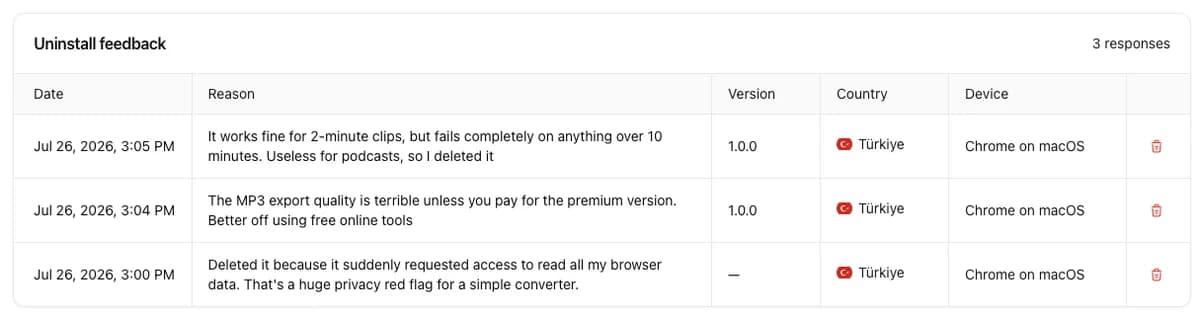
Look at the first response in that screenshot: works on short clips, fails on long ones. That is not necessarily a bug. It might be a deliberate limit for memory or performance reasons, entirely reasonable from the inside — and completely invisible from the outside until the user hits it after installing, granting permissions, and getting their hopes up.
The fix is often not engineering at all. State the limit in your store listing and in the interface before the failure, not after. A limit disclosed up front is a spec; the same limit discovered mid-task is a betrayal. If several answers name the same boundary, your store listing is overpromising.
"The paywall landed wrong"
Pricing complaints are rarely about the price. They are about the shape of the free tier. "The export quality is terrible unless you pay" is not a person saying your subscription costs too much — it is a person saying the free version was engineered to be bad, and they noticed.
There is a difference between a free tier that is smaller and one that is degraded. Fewer exports per month reads as fair. Deliberately worse output reads as manipulation, and the comparison people reach for is not your paid plan — it is a free website that does the same job. That comparison is fatal, and it shows up in uninstall answers long before it shows up in your conversion rate.
If this category is common for you, the question to ask is whether someone could get one genuinely good result for free. Our guides to monetization models and pricing go into how to draw that boundary.
"The permissions scared me"
The third answer in the screenshot is the one most developers underestimate: a converter that suddenly requested access to read browser data, described by the user as a privacy red flag. Note the word suddenly. This category is almost always triggered by an update, because a widened permission scope produces a re-consent prompt, and a re-consent prompt makes people evaluate your extension from scratch.
From the inside, the change is usually innocent — a refactor, a library, a new feature that needed broader host access. From the outside it looks like a tool that did one small job now asking to read everything. The user has no way to distinguish the two, and the safe response is removal.
- Request the narrowest scope that works, and prefer optional permissions requested at the moment of use over broad ones granted at install.
- When a scope must widen, say why — in the release notes, and in the extension itself the first time it matters.
- Never widen permissions in the same release as an unrelated change, or you will not be able to tell which one drove people away.
Google's own guidance on declaring permissions lists which ones trigger a warning at all, and our Manifest V3 guide covers how those prompts are worded and what users actually see.
"It slowed things down"
Performance complaints need care, because attribution is unreliable. Users blame the extension they can see. Someone running fifteen extensions who notices Chrome dragging will remove the one with the most visible icon, which may well be yours and may well be innocent.
Treat this category as a prompt to measure rather than a verdict. Check what your content scripts do on page load, whether you inject on every site when you only need a few, and how much your service worker does at startup. If the answers cluster on one type of site — heavy web apps, video pages — that specificity is a real signal rather than misattributed blame.
"I do not need it any more"
Some churn is healthy and permanent. A person installed a tool for a task, finished the task, and tidied up. There is nothing to fix here, and trying to fix it — with re-engagement notifications or friction on removal — makes the product worse for everyone else.
What this category is good for is calibration. If most of your answers fall here, your product is working and your churn is natural. If almost none do, every departure has a cause and you have a queue rather than a lifecycle.
Turning answers into work
- Tag every answer into one of the six categories. It takes seconds and turns prose into a distribution you can watch.
- Sort by repetition, not by intensity. The angriest answer is rarely the most common problem.
- Check the version column first. Anything that starts at a specific release is a regression, and regressions outrank everything else.
- Route by category. Broke goes to engineering, limits go to your listing copy, paywall goes to packaging, permissions goes to scope review, performance goes to profiling.
- Ship, then watch whether the sentences stop. That is the only confirmation that matters, and it is the step people skip.
Do that for a few release cycles and something quietly changes: the same complaints stop arriving, and the answers that remain are mostly people who finished what they came for. That is what a healthy feedback loop looks like — not zero uninstalls, but uninstalls that no longer have a cause you could have prevented.
The pattern behind all six categories is the same. Users hit problems you do not know about, and the ones who hit the worst problems are the least likely to tell you unless you ask at the one moment they have a reason to answer. For how those answers map onto your numbers, see reading your uninstall rate and the overview of Chrome extension uninstalls. Questions? Reach out through our contact form or email us at [email protected].