
cwspy.com · July 26, 2026 · 9 min read
Chrome Extension Uninstall URL: The Complete Guide

Someone just removed your extension. Inside your code, nothing happened — no event fired, no handler ran, no last request went out. By the time the removal is confirmed, your extension is already gone from the browser and cannot execute a single line. Chrome gives you exactly one hook for that moment, and it only works if you registered it in advance: an uninstall URL. This guide covers what setUninstallURL does, how to register it correctly under Manifest V3, what you may and may not put in the link, why it sometimes never opens, and how to turn that one open tab into something more useful than a counter.
Why no uninstall event fires, and what setUninstallURL does instead
It helps to be precise here, because the mental model most developers carry is wrong. A user removes an extension from the puzzle-piece menu or from the extensions page, confirms the dialog, and the browser tears it down: the service worker is terminated, the extension's local storage is discarded, its content scripts stop injecting, and its ID stops resolving. There is no shutdown phase you get to participate in.
This is a deliberate design decision, not an oversight. An extension that could run code during its own removal could also try to prevent it, phone home with whatever it still had access to, or reinstall itself. So the browser does not offer an onUninstall event, and there is no way to intercept, delay, or veto a removal.
There is no uninstall event. The only thing the browser will do on your behalf is open a web page you nominated ahead of time — a page that runs on your server, not in the extension.
That distinction is the whole subject of this article. Everything you learn about a departing user has to travel through a plain HTTP request to a page you control, triggered by the browser after your code is already dead.
What does chrome.runtime.setUninstallURL do?
The API is chrome.runtime.setUninstallURL(url, callback), documented in the chrome.runtime reference. You call it while your extension is running and healthy; you hand the browser a URL; the browser remembers it. Later, when the user removes the extension, Chrome opens that URL in a new tab. That is the entire contract.
- The URL must be absolute and use an
http:orhttps:scheme. In practice, use HTTPS — anything else is both bad hygiene and likely to be blocked. - It has a length limit. Keep the whole URL comfortably short; a link stuffed with query parameters can be rejected outright, and the callback is where you would find out.
- An empty string disables it. Calling
setUninstallURL('')clears a previously registered URL so no tab opens on removal. - It replaces, it does not stack. Each call overwrites the previous value. There is exactly one uninstall URL per extension.
- The callback tells you whether it took. If the URL is malformed or too long, the call fails and the error surfaces in
chrome.runtime.lastError— worth checking once during development rather than discovering months later that nothing was ever registered.
Note what is not in that list. The API does not tell you who uninstalled, when they installed, or how long they stayed. It opens a page. Anything else you want to know has to be encoded in the URL you register or asked on the page that opens.
Registering it correctly under Manifest V3
Here is where a lot of extensions quietly break. Under Manifest V2, a background page stayed loaded for the life of the browser session, so calling setUninstallURL once on install was effectively permanent. Under Manifest V3, your background script is a service worker that the browser terminates when idle and restarts on demand — the service worker lifecycle is documented, and it is unforgiving of setup code that only runs once.
The registration itself survives — it is stored by the browser, not by your worker — but you can no longer assume your setup code ran in this browser session at all. The safe pattern is to register on every worker startup as well as on install, so the value is always current and always set:
// background.js (service worker, Manifest V3)

function registerUninstallUrl() {
  const version = chrome.runtime.getManifest().version;
  const url = `https://example.com/uninstall?version=${version}`;

  chrome.runtime.setUninstallURL(url, () => {
    if (chrome.runtime.lastError) {
      console.warn('Uninstall URL rejected:', chrome.runtime.lastError.message);
    }
  });
}

// Runs whenever the service worker spins up.
registerUninstallUrl();

// And explicitly on first install and on every update.
chrome.runtime.onInstalled.addListener(registerUninstallUrl);
Two details in that snippet matter more than they look. Calling registerUninstallUrl() at the top level means it runs on every service-worker start, which is the Manifest V3 equivalent of "on every session". And reading the version from chrome.runtime.getManifest().version — rather than hardcoding it — means the link always reports the build the user was actually running when they left. That single parameter is the difference between knowing that people are leaving and knowing that they started leaving after your last release.
Register it early, before any conditional logic or awaited setup. If your worker throws on startup for an unrelated reason, you want the uninstall URL already registered rather than lost behind the exception.
What can you safely put in the uninstall URL?
The uninstall URL is a normal web request made by a person who has just chosen to stop using your product. Treat it accordingly. A few parameters make the difference between a useless ping and a useful signal, and a few others will get you into trouble.
| Parameter | Safe to include? | Why |
|---|---|---|
| Extension version | Yes | From the manifest at runtime. Tells you which build the user left on — the single most valuable field. |
| Install source or campaign tag | Yes | A static label you set yourself. Useful for comparing cohorts, contains nothing about the person. |
| Locale or platform | Usually | Coarse and non-identifying. The receiving page can also infer this from the request itself. |
| A random anonymous install ID | With care | Only if you disclosed it and it cannot be tied back to a person. Do not reuse an ID that also identifies an account. |
| Email, account ID, name | No | Personal data leaving the browser at the exact moment a user opted out. Do not do this. |
| Browsing history, page URLs, collected content | Never | Well outside what any user consented to, and a fast route to store removal. |
Be aware that this API has real critics. It is possible to build an uninstall URL that quietly re-identifies a user at the moment they leave, and some people consider the whole mechanism a privacy hole for exactly that reason. The criticism lands when the URL carries an identifier the user never agreed to; it does not land when the URL is a version number and an open question. Stay firmly on the second side of that line, and say so in your privacy policy.
Why is my Chrome extension uninstall URL not working?
This is the most common surprise, and it is the top question about this API on developer forums: the tab opens for some users and not others, so people assume their implementation is broken. Usually it is not. The browser only opens the page under conditions it controls, and several ordinary situations bypass it entirely.
- The extension was removed by policy. When an administrator pushes a removal through enterprise policy, no uninstall page opens — the user did not make the decision, so there is nobody to ask. See our guide to Chrome enterprise extension policy for how managed installs behave.
- The extension was disabled, not removed. Turning an extension off — including when the store turns it off, as happened during the Manifest V2 shutdown — is not an uninstall. Nothing opens.
- The whole profile or browser was removed. If the user deletes their Chrome profile or uninstalls the browser, your extension goes with it and no page is opened.
- The user was offline. The tab opens, the request fails, you never hear about it.
- The URL was never registered. The Manifest V3 trap above: the setup code ran once, months ago, in a worker that has been terminated a thousand times since. Register on every startup.
The practical consequence: your uninstall page sees a subset of removals, not all of them. That is fine for learning why people leave. It is not a reliable churn counter, and you should never present it as one internally.
Android and Chromebook
Two platform questions come up constantly. On Chromebooks, extensions behave exactly as they do on desktop Chrome — same API, same behaviour, with the caveat that school and workplace Chromebooks are usually managed, so the enterprise-policy case above applies far more often. On Android, Chrome has historically not supported extensions at all, so there is no uninstall URL to speak of; where a mobile browser does support extensions, support for this specific API is not something to assume.
Firefox, Edge, and the rest
The good news for anyone shipping to more than one store: this is a WebExtensions API, not a Chrome-only invention. Edge is Chromium-based and behaves identically, so an extension published through the Edge Add-ons store needs no change at all. Firefox implements the same method under the browser namespace — see MDN's runtime.setUninstallURL — and also accepts chrome for compatibility.
// Cross-browser: prefer the standard namespace, fall back to chrome.
const api = typeof browser !== 'undefined' ? browser : chrome;
api.runtime.setUninstallURL(url);
If you ship the same codebase to several stores, consider tagging the store in the URL. Uninstall reasons differ by audience more than most developers expect, and a one-word parameter tells you which store a departing user came from without touching anything personal.
A URL is only half of it — ask a question
Registering the URL is the easy part, and it is where most extensions stop. They point the link at their homepage, or at a "sorry to see you go" page with a newsletter form, and learn nothing. That is a wasted opportunity, because this is the single most honest moment you will ever get with a user.
Think about who else you hear from. People who leave a store review are a loud minority. People who file a bug report are a tiny, technical fraction. Everyone else — the overwhelming majority — hits a problem, gets annoyed, and removes the extension without a word. Your store dashboard registers the loss as a number and tells you nothing about the cause. Whole categories of failure never reach you: a feature that breaks on one specific site, a conflict with another popular extension, a regression shipped in last week's release, a permission prompt that read as alarming out of context.
The bugs that cost you the most users are, almost by definition, the ones nobody bothered to report.
An uninstall page turns that silence into text. One question, one optional field, no account, no required anything — the person is already leaving, and any additional friction simply produces an empty tab. Ask what did not work, capture the version they were on, and read the answers.
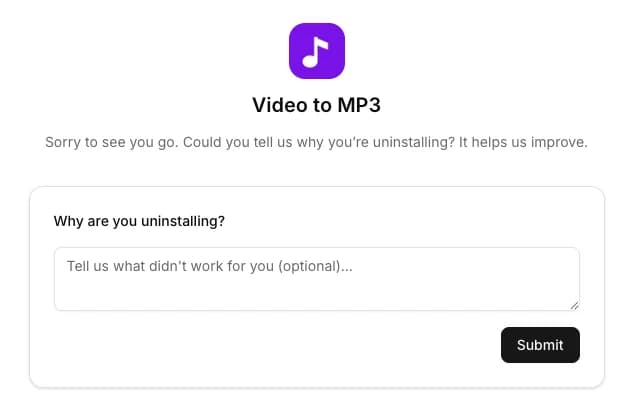
The answers are rarely vague. They arrive as specific, actionable sentences — a format that breaks on long files, an export quality that disappoints, a permission request that felt out of proportion to the feature. Each one is a fix you can ship, and each fix quietly stops the next batch of users from leaving for the same reason. That loop — collect, read, fix, watch — is what turns an uninstall page from a vanity metric into a quality process.
Wiring it up without writing the code yourself
If you would rather not hand-roll the page, the request handling, and the storage behind it, cwspy gives every extension you track a ready-made uninstall feedback page and a link to point setUninstallURL at. Alongside the link it hands you a prepared instruction for an AI coding assistant, so the registration lands in your repository without you writing the snippet above by hand.
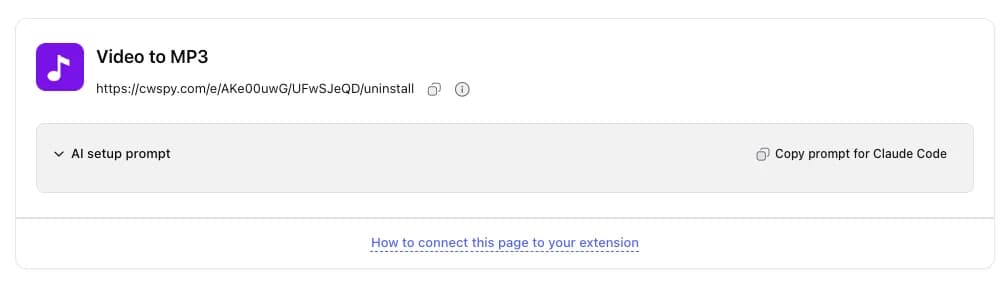
Copy the prompt into your assistant of choice, point it at your extension's repository, and it adds the call — reading the version from the manifest, exactly as described above — so the version a user left on arrives with their answer. From then on the responses collect on one page, newest first, with the version, country, and device alongside each one.
Implementation checklist
In your extension
- Call
setUninstallURLat the top level of your service worker, so it re-registers on every startup — not only insideonInstalled. - Build the URL with HTTPS and keep it short, well inside the length limit.
- Append the version from
chrome.runtime.getManifest().versionrather than a hardcoded string. - Check
chrome.runtime.lastErrorin the callback once during development to confirm the URL was accepted. - Use the
browsernamespace with achromefallback if you also ship to Firefox.
On the page it opens
- Ask one question and make the field optional.
- Require no account, no email, and no confirmation step.
- Record the version so you can tie a spike to a specific release.
- Do not attempt to re-identify the visitor, and say as much in your privacy policy.
- Read the answers regularly and treat repeated phrases as a bug queue, not as sentiment.
One API call, one honest question, and a habit of reading the replies. That is the whole implementation — and it is the only channel through which the users you are losing will ever tell you why. Once the answers start arriving, the next question is which release they cluster around — for that, see how to read your uninstall rate and the wider picture in Chrome extension uninstalls. Questions about any of this? Reach out through our contact form or email us at [email protected].