
cwspy.com · July 26, 2026 · 9 min read
Chrome Extension Uninstalls: What Happens and Why

Every extension developer watches the same number: how many people are using this thing. It goes up, which is pleasant, and it goes down, which is not — and when it goes down, the store tells you nothing about why. This guide is the map of everything that sits behind that number. What actually happens when someone removes your extension, why the browser gives you almost nothing to work with, the one hook it does give you, and how to turn a departure into a sentence you can act on. Each section links to a deeper guide; read this one first to see how the pieces fit.
Three ways an extension disappears
"My users dropped" covers three very different events, and confusing them will send you chasing the wrong problem. Before anything else, work out which one you are looking at.
| What happened | Who decided | Do you hear about it? |
|---|---|---|
| The user uninstalled it | The user | Only if you registered an uninstall URL in advance |
| The user disabled it | The user | No — the extension is still installed, just switched off |
| The browser or store turned it off | Google, or an administrator | No — and it is not an uninstall, so no page opens |
The third row catches people out badly. When a platform change deactivates a whole class of extensions — as the Manifest V2 shutdown did — your users see a message telling them the extension is no longer supported, your numbers fall, and not one of those people made a decision about your product. The same is true when an administrator removes an extension through enterprise policy: the person using it was never consulted.
So the first question when a graph turns down is not "what did we do wrong" but "did anyone actually choose this". Only real uninstalls carry a reason worth chasing.
What happens when you uninstall a Chrome extension?
Here is the part that surprises most developers: from inside your extension, an uninstall is completely invisible. There is no event. Nothing fires. The browser terminates your service worker, discards your local storage, stops injecting your content scripts, and your extension ID stops resolving. By the time removal is confirmed, your code cannot execute at all.
Chrome does not give you an uninstall event, and no amount of clever code will produce one. The removal is deliberately not something your extension gets to participate in.
That is a security decision, not an oversight — an extension that could run code while being removed could also try to stop it, exfiltrate whatever it still had access to, or reinstall itself. Read through the chrome.runtime API reference and you will find no uninstall event of any kind. The trade-off is that you learn nothing by default.
The one exception is a URL you nominated ahead of time. Register it while your extension is healthy, and when a user removes it the browser opens that page in a new tab. It is the only channel that survives the removal, because it runs on your server rather than in the extension. How to register it correctly — and the Manifest V3 trap that silently disables it — is covered in the complete guide to the uninstall URL.
Can the Chrome Web Store dashboard show uninstalls?
The Chrome Web Store reports a user count, and developers reasonably treat it as their churn signal. It is not one, for three separate reasons.
- It is a net figure. A week where 300 people installed and 300 left looks identical to a week where nothing happened at all. The churn is invisible underneath the flat line.
- It is coarse and delayed. The figure shown publicly on a Chrome Web Store listing moves in rounded steps, so small changes hide entirely and the moment a decline starts is hard to pin down.
- It contains no reasons. This is the fundamental limitation. A count is an outcome. You need a cause, and no aggregate number contains one.
Reviews do not fill the gap either. People who leave a store review are a loud, self-selected minority — usually either delighted or furious — and someone quietly disappointed by a broken feature rarely stops to write one. The middle of your distribution never speaks in public.
The users you lose know things you do not
This is the argument that runs through every article in this series, so it is worth stating plainly here.
Consider the funnel of who tells you about a problem. A user hits a bug. Most shrug and stop using the feature. A smaller group works around it. A smaller group still leaves a one-star review. A tiny, technical minority finds your support address or your issue tracker and files a proper report. And a large share of everyone affected simply removes the extension and moves on without a word.
The failures costing you the most users are, almost by definition, the ones nobody bothered to report.
The specific things that reach you through no other channel are remarkably consistent across extensions: a feature that works everywhere except one popular site, a conflict with another widely installed extension, a regression shipped in last week's release that your own testing missed, a permission prompt that read as alarming to someone without the context you have, a limit nobody knew about until they hit it.
None of that appears in an install graph. All of it appears, in plain language, in answers collected at the moment of departure — which is also the most honest moment you will ever get, because the person has nothing left to lose and no relationship to protect. Read them regularly and the list turns into a queue of fixes; each fix quietly stops the next batch of users from leaving for the same reason. That loop is the whole point.
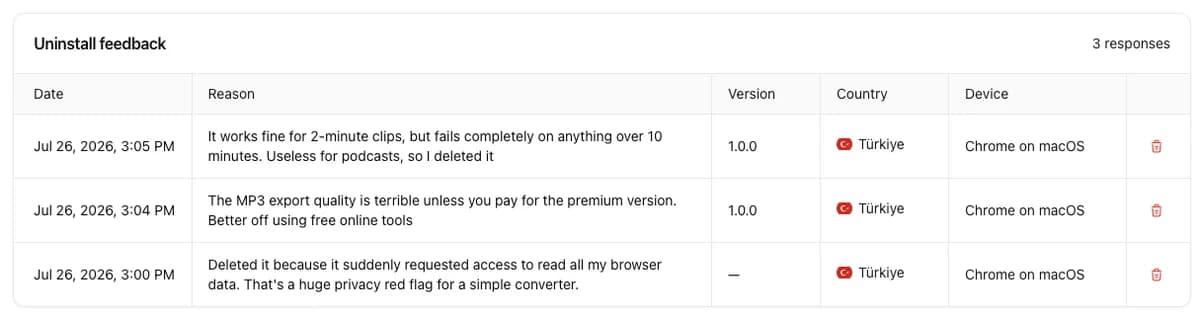
Three answers, three different fixes — an engineering bug, a packaging decision, and a permissions problem. A user-count chart would have shown all three as the same downward tick.
How do you ask departing users why they left?
Having a channel is not the same as getting answers through it. The design that works is aggressively minimal: your extension's name and icon, one question, one optional field, a submit button, nothing else. No account, no email, no rating scale, no second page.
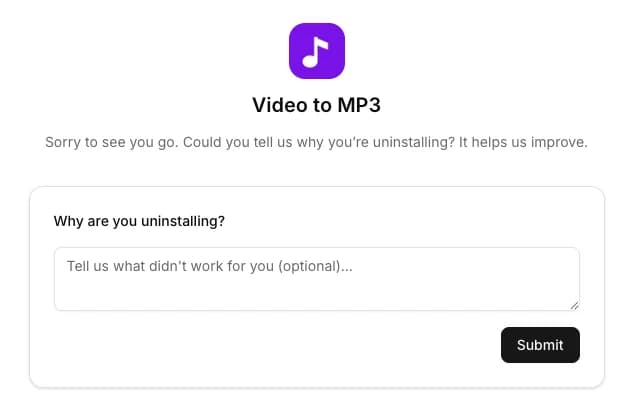
Capture the version they were running alongside the answer — it is the difference between a pile of complaints and a dated regression report. The full design brief, the columns worth keeping, and the mistakes that kill the response rate are in how to build an uninstall feedback page. For what people actually write once you start asking, see why users uninstall Chrome extensions.
Measuring departures honestly
Two cautions before you start putting these numbers in front of anyone.
First, an uninstall page sees a subset of removals. Users who were offline, users removed by administrator policy, users who deleted their whole browser profile — none of them reach your page. It is an excellent source of reasons and a poor census of departures, and presenting it as the latter will get you into trouble internally.
Second, resist averaging it. The sample is self-selected and skewed toward the annoyed. Treat repeated phrasing as a priority queue of defects, not as a satisfaction score. Our guide to reading your uninstall rate covers what can and cannot be inferred, and how to line answers up against your release history.
And because this involves collecting something from people at a sensitive moment, it is worth knowing where the line is. There is a legitimate critique of uninstall tracking, and it lands squarely on implementations that quietly re-identify users as they leave — uninstall tracking without crossing the privacy line walks through what is fair to collect and what is not.
A short plan
- Work out whether your decline is uninstalls, disables, or a platform change. Only the first has reasons attached.
- Register an uninstall URL, and register it on every service-worker startup — not once on install.
- Put a one-question page behind it, with no account and no required fields.
- Record the extension version with every answer.
- Read the answers regularly. Sort by what repeats, not by what stings.
- Fix the repeats, ship, and check whether the sentences stop.
- Keep it anonymous, and say in your privacy policy what the page collects.
The rest of the series
- How to remove a Chrome extension — and what happens next — the user's side of the same event.
- Chrome extension uninstall URL: the complete guide — the API, the Manifest V3 trap, and why it sometimes never fires.
- Build an uninstall feedback page — the page design that actually gets answered.
- Why users uninstall Chrome extensions — the reasons people give, and what each one means.
- Reading your uninstall rate — churn maths without fooling yourself.
- Uninstall tracking and privacy — where the line is, and how to stay on the right side of it.
Losing users is normal; losing them without learning anything is a choice. One API call and one honest question turn the most opaque event in your product into the clearest feedback you will ever receive. Questions about any of this? Reach out through our contact form or email us at [email protected].