
cwspy.com · July 26, 2026 · 9 min read
Build a Chrome Extension Uninstall Feedback Page

Your extension lost forty users last week. Your store dashboard will tell you that much and nothing more — not which forty, not why, not whether it was one broken release or forty unrelated disappointments. An uninstall feedback page is the one channel that closes that gap: a single question shown at the exact moment someone walks away, answered in their own words. This guide covers what such a page needs to contain, the mistakes that make people close the tab, and how to get one running without building it yourself.
Why a one-question page beats an exit survey
When a user removes your extension, the browser can open one URL on your behalf — that is the whole mechanism, and the chrome.runtime reference offers nothing else for the occasion. We cover the API in detail in our guide to the Chrome extension uninstall URL, and the wider picture — what a removal is and what your store numbers can and cannot tell you — in our overview of Chrome extension uninstalls. What lands on the other side of that link is entirely your decision, and the decision matters more than the code.
Most extensions point it at their homepage, a donation page, or a newsletter signup. All three treat a departure as a conversion opportunity, and all three collect nothing. A few point it at a proper survey — five questions, a rating scale, an email field — and collect almost as little, because nobody who is in the act of leaving fills in a form. The response rate on a five-question exit survey rounds to zero.
You have one screen, a few seconds of attention, and a person who owes you nothing. Ask one question.
The page has to earn its answer in the first second. A logo they recognize, a sentence that acknowledges they are leaving, one open field, and a button. No account, no email, no required fields, no second step. That is the entire design brief, and every element you add past it costs you answers.
What should an uninstall feedback page show?
Here is what the page looks like when you keep it to the essentials. Your extension's icon and name so the person knows which of their extensions this is about, a line that acknowledges the departure without pleading, one question, one optional field.
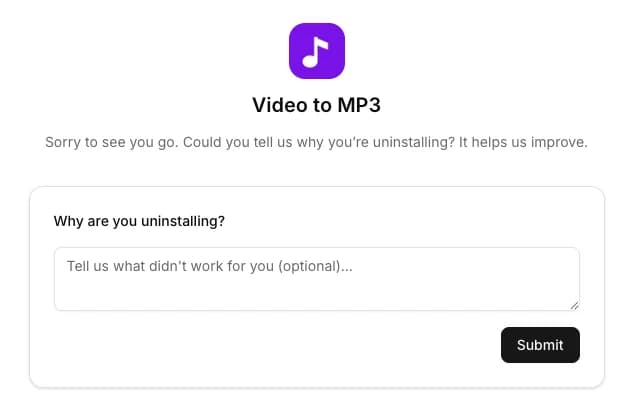
Three things about that screen are deliberate:
- The extension is named and pictured. People install dozens of extensions and forget most of them. A page that opens saying only "sorry to see you go" reads as spam; one that shows the icon they just clicked reads as legitimate.
- The field is optional. Marking it required does not produce more answers, it produces more abandoned tabs. Let people submit nothing — you still learn that the page was opened.
- Nothing is asked in return. No email capture, no "before you go, try our Pro plan". The moment you ask for something, the answer rate falls off a cliff, and the answers you do get skew toward people who wanted to complain loudly.
The tone of the question matters too. "Why are you uninstalling?" works. "What went wrong?" works. "Are you sure you want to leave?" does not — it reads as an attempt to reverse the decision, and the decision is already made.
What you should see on the other side
The collecting half is easy to get right. The reading half is where most implementations fall apart: answers land in an inbox, get skimmed once, and are never seen again. What you want is a single list, newest first, that you can scan in a minute and act on.
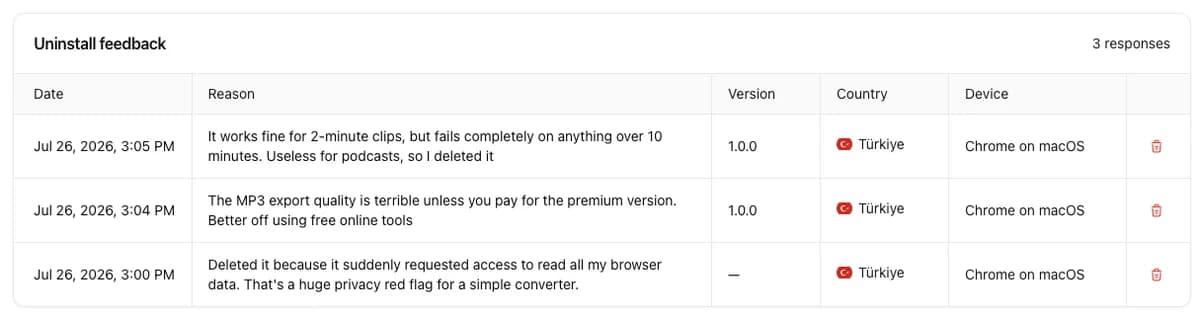
Each of those columns earns its place, and the reason is the same in every case — a sentence alone is a complaint, a sentence with context is a bug report.
| Column | Why it matters |
|---|---|
| Reason | The words themselves. Repeated phrasing across answers is your bug queue, in priority order. |
| Version | Which build the person was running when they left. Turns a scatter of complaints into "this started with 1.4.0". |
| Date | Lets you line answers up against your release history and against dips in your user count. |
| Country | Surfaces problems that only exist in some markets — a locale bug, a blocked service, a translation that reads badly. |
| Device and OS | Separates "the extension is broken" from "the extension is broken on macOS". |
Look at the three answers in that screenshot. One is a functional limit — it works on short clips and fails on long ones. One is a pricing objection — the free output quality is not good enough to be worth keeping. One is a permissions problem — a request to read browser data felt disproportionate for what the extension does. Those are three completely different fixes: an engineering task, a packaging decision, and a permissions review. None of them would have been visible in a user-count chart.
Count the opens, not just the answers
There is a subtlety worth building in. Someone who opens your feedback page and closes it without typing has still told you something: they uninstalled, and the browser reached your page. Someone who never appears at all may have been offline, or removed by policy, or never had the URL registered.
Keeping those two numbers separate — pages opened versus reasons given — gives you a response rate you can watch. If opens are steady but answers collapse, something about your page changed for the worse. If both fall together, look at your extension, not your page.
It also stops a common misreading. A page that records only submitted answers makes it look as though every departing user explained themselves, which flatters the data badly. Most people say nothing. The ones who do are doing you an unusual favour.
How do you add an uninstall feedback page without building one?
Building this yourself means a page, a form handler, storage, spam handling, and somewhere to read the results — a day or two of work for something that is not your product. cwspy gives every extension you track a ready-made uninstall feedback page instead, with no separate setup step: tracking the extension is what creates the page.
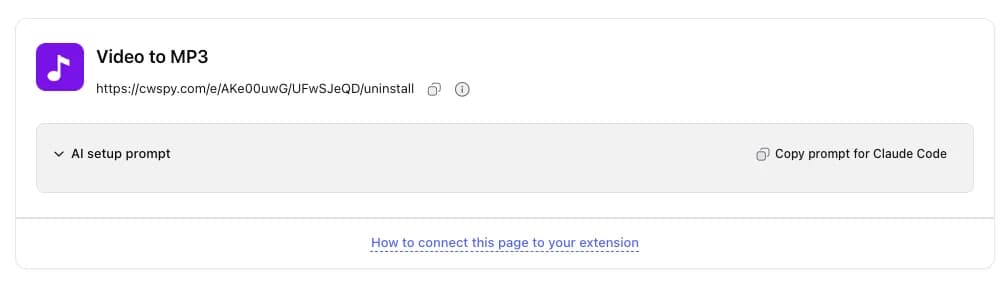
You get a link that belongs to your extension and your account. Point setUninstallURL at it and the answers start collecting. If you would rather not open your editor at all, copy the prepared prompt next to the link into an AI coding assistant, point it at your extension's repository, and it makes the change — including reading the version from the manifest, so every answer arrives tagged with the build the person was running.
- Add your extension to cwspy so it is being tracked.
- Open its uninstall page and copy the link — or copy the setup prompt.
- Register the link with
setUninstallURLin your extension, by hand or via the prompt. - Ship the release, then read the answers as they arrive.
The responses collected through your link are yours alone. Stop tracking the extension and the page stops working; the answers you already collected stay where they are.
Reading the answers without fooling yourself
Collected feedback is only worth the habit of reading it. A few rules keep the exercise honest.
Treat repetition as priority
One person saying an export is slow is an anecdote. Six people saying it in a fortnight, all on the same version, is a defect with a date attached. Sort by what repeats, not by what stings.
Do not average sentiment
This is not a satisfaction score and it never will be — the sample is self-selected, skewed toward the annoyed, and blind to everyone the browser never sent your way. It is a source of defects, not a measurement of feeling. The moment someone puts it in a slide as a percentage, it starts misleading people.
Watch the version column
The single most useful pattern is a reason that appears only after a specific release. That is a regression you introduced, discovered by the people it drove away — the exact class of problem that never reaches your issue tracker. Pair the answers with your release history and it becomes obvious quickly.
Close the loop
Fix what repeats, ship it, and watch whether the same sentences stop arriving. That loop — collect, read, fix, verify — is what makes the page worth having. Without the last step you have a complaints box; with it you have a quality process that runs on the users you would otherwise have lost silently.
Pitfalls that quietly kill the channel
- Pointing the URL at your homepage. The most common setup, and it collects nothing.
- Asking for an email address. Converts a two-second answer into a decision about giving you contact details. Most people decline both.
- Registering the URL only on install. Under Manifest V3 the service worker restarts constantly; register on every startup or the page may never open. Details in the uninstall URL guide.
- Sending answers to an inbox nobody opens. If reading them is a chore, it will not happen after week three.
- Trying to identify the person. Beyond being a privacy problem, it changes what people are willing to write. Anonymity is why the answers are blunt enough to be useful.
An uninstall feedback page costs one API call and one screen, and it is the only place where the users you are losing tell you why. Everything else you measure — installs, ratings, your user count, your usage analytics — tells you what happened. This tells you the reason. For what the answers turn out to say, see why users uninstall Chrome extensions. Questions about setting one up? Reach out through our contact form or email us at [email protected].